
I Built a Free Reel Image Maker — No Account, No Watermark, No Designer Required
- •
- 5 min
- •
- RSS

Forward Deployed Engineer · Dubai
You need an image for a post. A headline, two or three bullet points, a call to action. Maybe it's a vertical cover for a reel, maybe a square for the feed, maybe a 1200×630 card for when someone shares your link. You're not a designer. The tools that exist for this were mostly built for people who want to design things — not for people who already know what they want to say and need an image in the next ten minutes. Getting from a blank canvas to a ready-to-post file takes more steps than the task deserves.
That gap is what I built Reel Image Maker to close.
What it does
You fill in a form — headline, bullets or description, CTA text, footer. Pick one of 27 dark gradient presets. Choose fonts for each section independently. Pick the size you need. Hit Generate. Download the PNG, or copy it straight to your clipboard.
It started as a tool for reel covers, but it now outputs six sizes:
- 1080×1920 — Reels, TikTok, and YouTube Shorts covers (vertical)
- 1080×1350 — portrait feed posts (4:5)
- 1080×1080 — square posts (1:1)
- 1080×566 — wide landscape
- 1200×630 — Open Graph cards, the image that shows when your link is shared
- 1000×1500 — Pinterest pins
Switch between them with one control. Turn on auto-scale and the font sizes adjust to the new dimensions so your headline doesn't blow past the edges when you go from a tall reel to a wide card.
A few features worth knowing about:
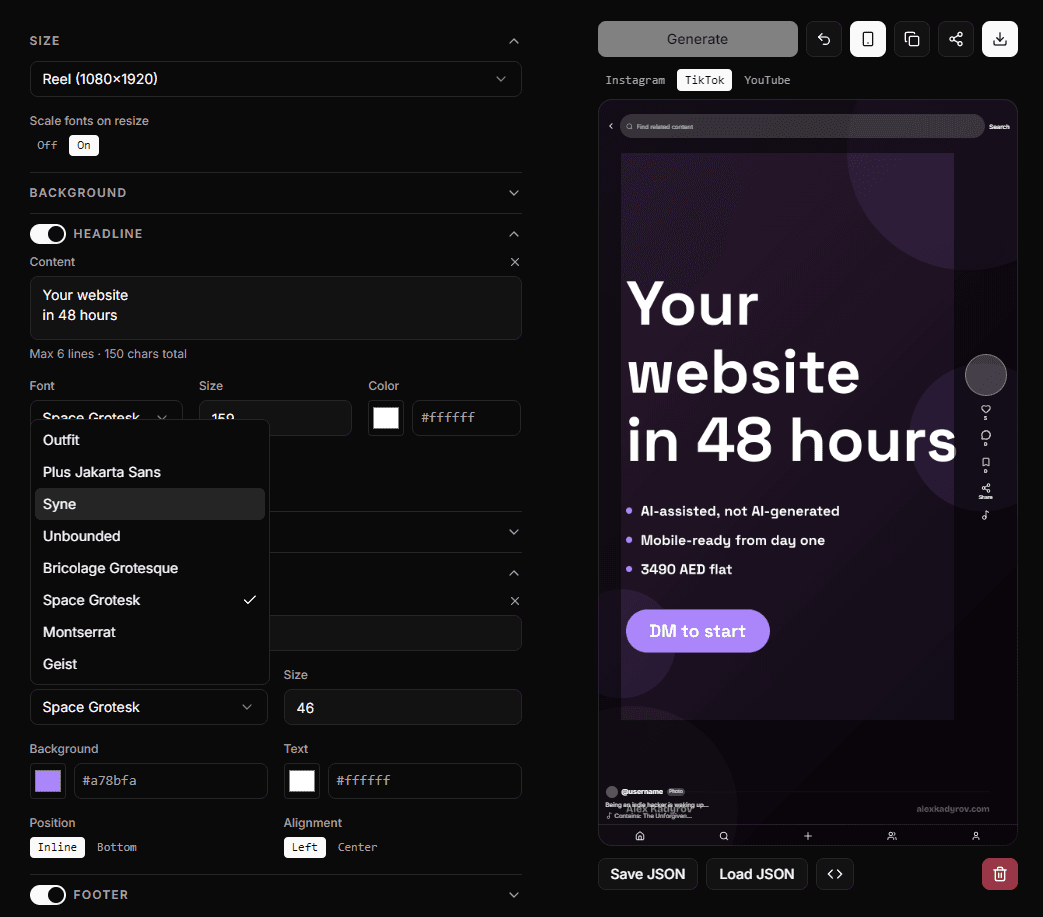
Safe zone preview. Instagram, TikTok, and YouTube each cover different parts of the frame with their UI — the caption area, side actions, the navigation bar. The app has a toggle that renders the actual platform chrome over your preview so you can see exactly what gets cropped before you post. If your CTA is sitting behind TikTok's like button, you find out in the app, not after publishing.
State lives in the URL. Every setting — gradient colors, fonts, content, size, layout — is encoded into the page URL as you work. Your design is shareable: send someone the link and they open the app with your exact settings already loaded. You can bookmark your go-to setup, or save it to a JSON file and load it back later — no account, because there is no account.
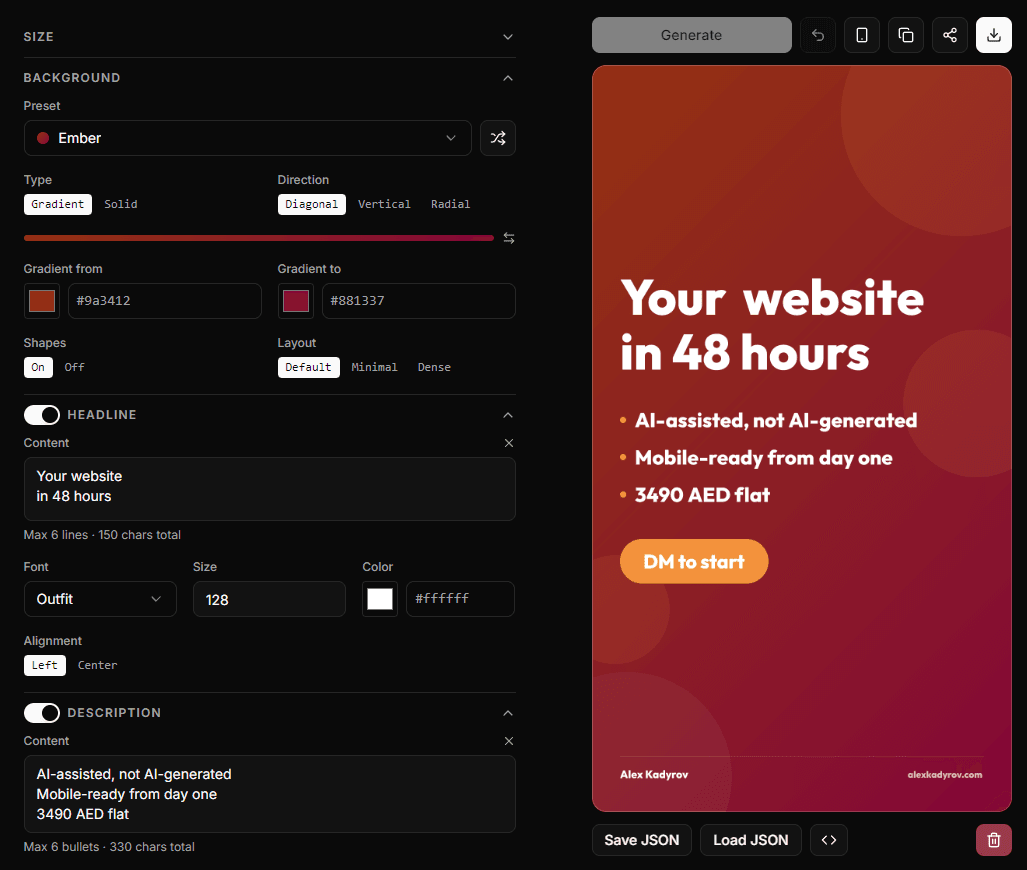
27 presets, fully overridable. Each preset is a gradient pair, an accent color, and a font combination — Abyss, Acid, Aurora, Blueprint, down to Umber. All dark, all legible on any screen. Every value is overridable: hex color input for each element, independent font selection from 8 fonts for headline, body, CTA, and footer, size controls for all of them, solid background instead of a gradient if you want one. Or hit the shuffle button and randomize everything.
No watermark. No account. Free.
Why I built it
I make content myself — promotional posts on X and Threads, carousel slides, reel images. Each time I needed a new image I went through the same friction: open something, start from scratch or adapt a template that wasn't quite right, export, check if the CTA was visible on mobile, sometimes redo it. Twenty minutes for something that should take five.
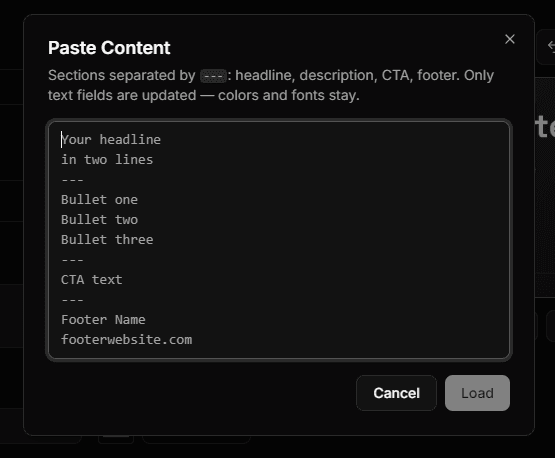
So I built the tool I wanted. The safe zone preview came from actually posting and checking how platforms cropped my own images. The paste dialog — which lets you fill all text sections at once from a structured block — came from making carousel content where I was entering the same format repeatedly. The shuffle button exists because "surprise me" is a legitimate design choice when you're trying to move fast.
I built the first working version in a single evening, then polished it over two or three more — 10 to 12 hours in total. It launched as a free tool and kept growing as I used it myself.
It's also, honestly, a demo. Across my career I've built more than 30 products — some shipped and still running, some sold, some abandoned, some discontinued after I realized the model was wrong. When I talk to businesses about building tools for them, they sometimes want to see something concrete. Reel Image Maker is one answer to "show me what you ship." It went from idea to live in 10 to 12 hours of work across a few evenings.
Why the constraints are features, not limitations
The 27 presets are all dark because dark gradients look sharp on phone screens — not because I didn't build a light mode. The decision made the tool more useful for its actual context.
The preset list exists because "choose from these 27 options and they'll all look good" produces faster decisions than an infinite color picker with no guardrails. Constraints are useful. When you sit down to make one image for a reel you're posting today, you don't want to design a color palette from scratch — you want to pick something that works and move on.
Same logic for the lack of an AI headline generator, template marketplace, or anything that suggests the tool should write your content for you. You already know what you want to say. The tool gets out of the way.
Try it
Reel Image Maker is free and lives on this site. No sign-up, no email address, no watermark on the output.
If you make content for Instagram, TikTok, YouTube, or Pinterest and you're not a designer, that's who it's for. If you have a feature you want, there's an email link on the page.
If your business has a workflow that's still living in a spreadsheet, a WhatsApp thread, or a tool that was never built for the job — that's the kind of problem I build for. See the Internal Tools service page or book a call.